Understand Member Roles
Compare the built-in roles for colleagues, external users, and system access. Read the transcript
A Member's role grants Workspace permissions; ownership and explicit sharing also determine access. Review the built-in roles before assigning one to a colleague, external participant, or Agent.
Before You Begin
- Sign in with a role that can open Members → Roles.
Compare the Built-In Roles
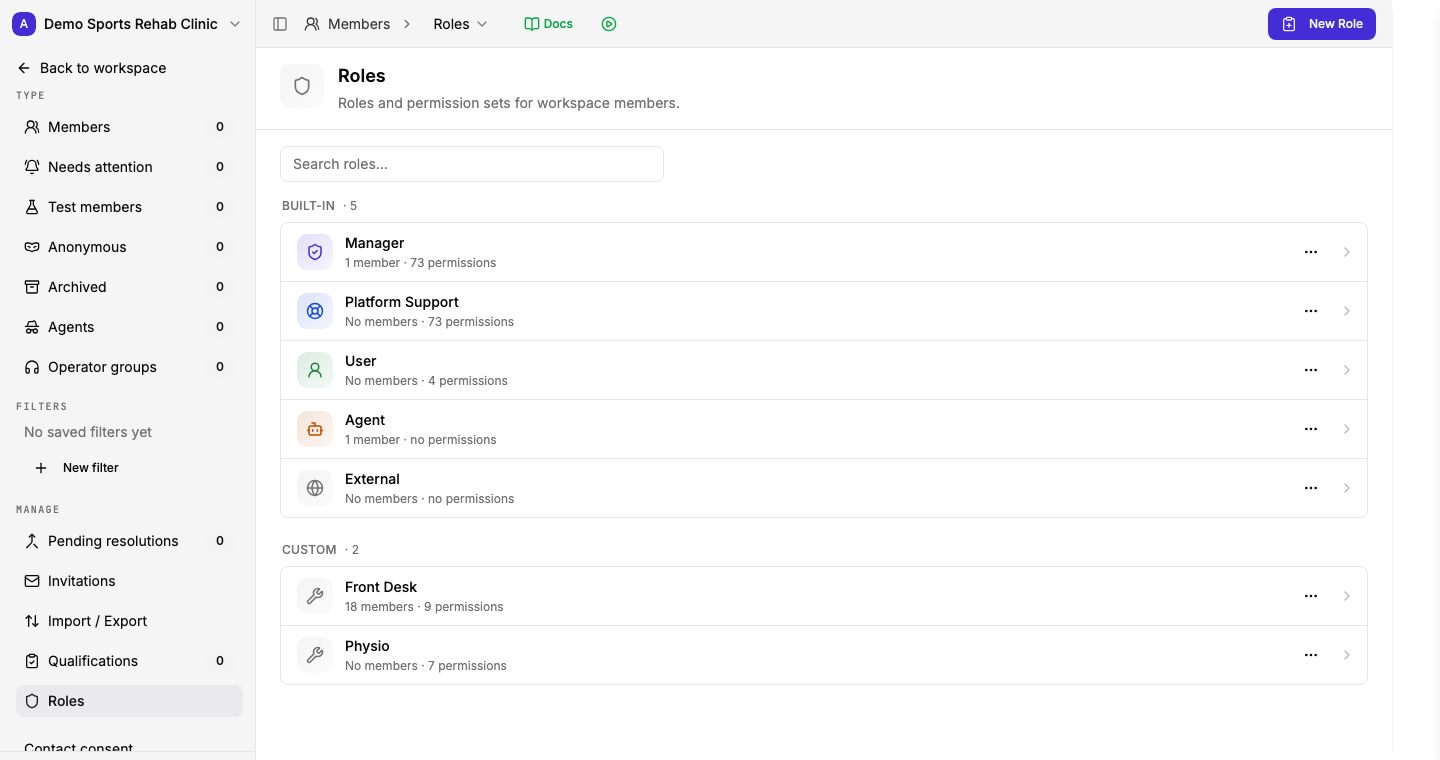
Built-in roles
Review the standard roles and their permission counts.
Compare built-in and custom roles before choosing access for a Member.
View full size ↗The first label starts open. Hover or focus to explore; click or tap to pin.
Open Members → Roles to review the built-in roles.
| Role | Who it is for | Access |
|---|---|---|
| Manager | People administering the Workspace | Manage Workspace settings, Members, and Workflows. Individual Files, Folders, and Site audiences have their own access settings. |
| User | People participating without administering the Workspace | Limited access, such as messaging an Agent. |
| External | People outside your team | Their own Assignments and Chats; no workspace permissions. |
| Agent | AI Agents | No permissions from the role itself; access comes from configured tools and scopes. |
| Platform Support | Authorized Gravity Rail support | Reserved for support access; Workspace operators cannot assign it. |
Use a Workflow's Member Role Gate to restrict who can start it. Members can work with their own Form records without a per-Form Role grant.
See Roles & Permissions for role configuration. Continue with Set up phone numbers.